
AI Tools for Visualisation
In this article, we provide you with an overview of AI tools we love to use to visualise ideas quickly. The world of AI offers so many possibilities to create stunning visuals with ease. However, be careful with "too perfect" visuals early in the innovation process. As soon as you fall in love with your visuals, any feedback you get is even more difficult to embrace with a rational mind. Nevertheless, visuals are always a great facilitator of team discussions.

Markus Sorg
Business Design Prototyper
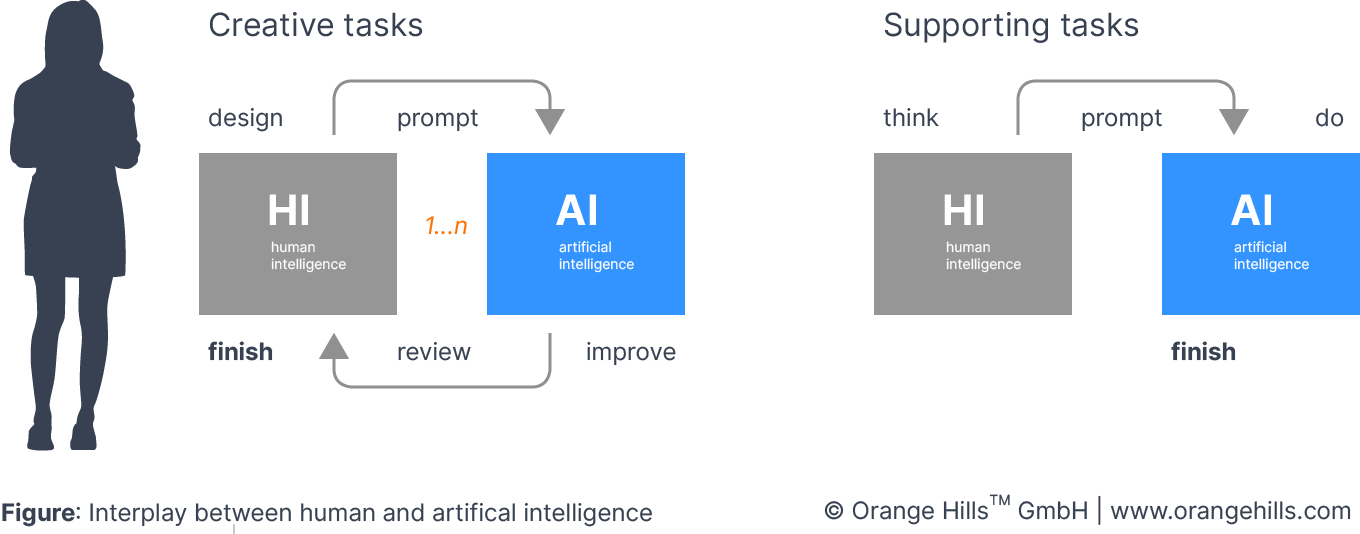
AI is a powerful tool for executing Business Design faster and smarter. But it doesn’t replace our approach — it strengthens every phase of the end-to-end innovation process, often in fundamental ways. Think of it as an interplay between HI (“human intelligence”) and AI (“artificial intelligence”). How the two work together will keep shifting as the technology advances.
The pace of AI progress is stunning, and it’s a huge opportunity for how we shape innovation work. AI now delivers results, on certain tasks, that humans alone could never produce in the same time. The clearest examples: analyzing large, messy datasets in customer and market research, and building visual models and prototypes. Here is the catch: AI-generated work looks polished, often “pefect”, maybe too polished. That illusion of perfection makes it hard to judge whether the result is actually “good” and makes sense in the context of the innovation endeavour. And it cuts both ways — your competitors are running the same tools and similar prompts. That polish won't be what sets you apart.
Here is what AI won’t replace: the innovator, the designer, the creative mind who does more than execute tasks efficiently — who convinces people, through passion and conviction, to believe in a new business model, service, or product. AI won’t break down organizational barriers for you. It won’t build high-performing teams or rally them around a shared mission. Success still depends on these human skills. Now and in the future. Neverthless, we embrace the technological advancements and use them extensively.
In practice, we split AI use into two kinds of tasks.
Creative tasks: Any task that fundamentally shapes the outcome of innovation work stays, first and foremost, with human intelligence. Not because humans always do it better — but because our creative skills, as designers, are what make the real difference. We need to believe in our idea and fight for it. We need to be involved emotionally and that takes “skin in the game”. We stay involved and keep shaping the core of our innovation ourselves.
However, that doesn’t mean we skip AI here. It means we work in three steps:
Step 1: Build a first version using your own creative skills — for example, the core elements of a business model or the storyline for a marketing concept.
Step 2: Use AI tools to improve, expand, or challenge that first version from new angles.
Step 3: Review what AI produced in step 2, then use your creative skills again to integrate what is useful. Your idea can change radically at this point — even should, if the input calls for it. But you stay the designer of your own innovation.
Supporting tasks: Any task that enables creative work, or improves what happens before or after it, gets full AI support. This is pure efficiency. AI beats human ability at analysing large datasets, pulling out key insights, tracking down missing information, or even building digital click dummies and prototypes. It’s a genuine advantage for instance to generate five landing page variants at the push of a button, each pitching a new business model to a specific audience. But only once a designer has already shaped the story behind that business model — that’s a creative task. Supporting tasks rarely demand deep emotional investment from the designer. Using AI here doesn’t replace the Business Designer. It makes us faster and smarter.
Here is a list of AI design tools we use on a regular basis:
UI Mockups & Software Prototyping
Figma AI (Make) | Turns rough ideas into editable UI prototypes with AI-generated layouts and components inside Figma's design environment. | |
Uizard | Generates app and web mockups from text prompts or hand-drawn sketches using its Autodesigner feature. Great for non-designers. | |
Visily | AI-powered wireframing and high-fidelity prototyping tool that converts text descriptions and screenshots into editable UI designs. | |
Banani | Full-stack prototyping co-pilot for non-designers. Describe a screen or user flow, get multiple editable hi-fi UI variants. | |
Google Stitch | Google's AI-native design canvas generating high-fidelity UI from text prompts, images, sketches, or voice commands. | |
Moonchild AI | AI design generator that creates production-ready UI components and full-page layouts from natural language prompts. | |
MockFlow | Wireframing and UI planning suite with AI-assisted layout generation, sitemaps, and design collaboration features. |
Tools for Prompt-to-Code Prototyping
Lovable | Describe your software idea in plain language and get a functional, deployed web app prototype — frontend and backend included. | |
Bolt.new | Full-stack app generator by StackBlitz. Prompt your idea, get a running web app with code you can edit directly in the browser. | |
v0 (Vercel) | AI-powered UI component generator that creates React/Next.js interfaces from text descriptions. Ideal for SaaS idea visualization. | |
Replit Agent | AI agent that builds, deploys, and iterates full applications from conversational prompts inside Replit's cloud IDE. | |
Anima Playground | Turns wireframes, Figma designs, and text prompts into functional React apps that can be handed off to engineering. |
Business Modeling & Strategy Visualisation
Creately | AI-driven Business Model Canvas generator that auto-populates value propositions, customer segments, and revenue streams from your idea. | |
Visual Paradigm | AI canvas tools for Business Model Canvas, Lean Canvas, SWOT, and Customer Journey — plus auto-generated pitch deck outlines. | |
Miro AI | Visual collaboration platform with AI-powered canvas features for brainstorming, Business Model Canvases, and service blueprints. | |
Relume | Generates complete sitemaps and wireframes from a text prompt. Ideal for mapping out service and product website structures fast. | |
Visual Concepts & Product Rendering
Midjourney | Leading AI image generator for concept art, product visualizations, mood boards, and brand identity exploration from text prompts. | |
Rendair AI | AI-powered product design rendering tool that turns sketches or prompts into photorealistic product visuals and 3D-style renders. | |
Canva AI | All-in-one design platform with AI mockup generator, Magic Design, and text-to-image features for product and marketing visuals. |
Check out our AI Library with an ever-growing list of AI goodies and prompts.