
Business Model
One page. One business model. The Business Model template forces your team to visualise every essential ingredient of a future business scenario -- and skip the bullsh*t. Learn how to use it, what each element means, and download the template for your team.
Content
1. Overview
Start with the left side of the template: How do you reach and serve your customers and users? Then move to the right: How does your organisation create and deliver value? The lower part -- the "Profit Formula" -- captures how you generate revenue and what costs are involved.
The centre of the template holds the Business DNA: the very essence of your business model. If you had only 60 seconds to pitch your new business, focus on the DNA. It answers three questions: What Job(s) to Get Done do your customers have? What core value do you create? What is your unfair advantage?
Think in scenarios. There are always multiple ways to create offerings, serve customers and charge them. Be as clear as possible and avoid nonsensical jargon. While it is easy to scratch the surface, try to imagine how your new business model really works.
How is this different from the Business Model Canvas? If you have worked with the Osterwalder Business Model Canvas (BMC) before, you will notice similarities -- but also important differences. Our Business Model template puts the customer's Job(s) to Get Done at the centre, not a generic "Value Proposition". It explicitly separates customers from users, adds the concept of an "Unfair Advantage", and introduces a "Business DNA" as a storytelling anchor. The Profit Formula replaces the BMC's separate "Revenue Streams" and "Cost Structure" blocks with a more integrated view. In short: our template is designed for innovation teams who need to design and challenge a business scenario, not just document one.
Related tools: The Business Model template works together with several other tools. Use the Business Eco-System to map out the network of partners, suppliers and other stakeholders around your business model. Use the Financial Sanity Check to stress-test the numbers behind your Profit Formula. The Service Blueprint helps you design and detail the processes and touchpoints in your business model. You will typically create your first Business Model in the Design Workshop during the Design Phase (see also Business Modelling).
2. Layout & Download
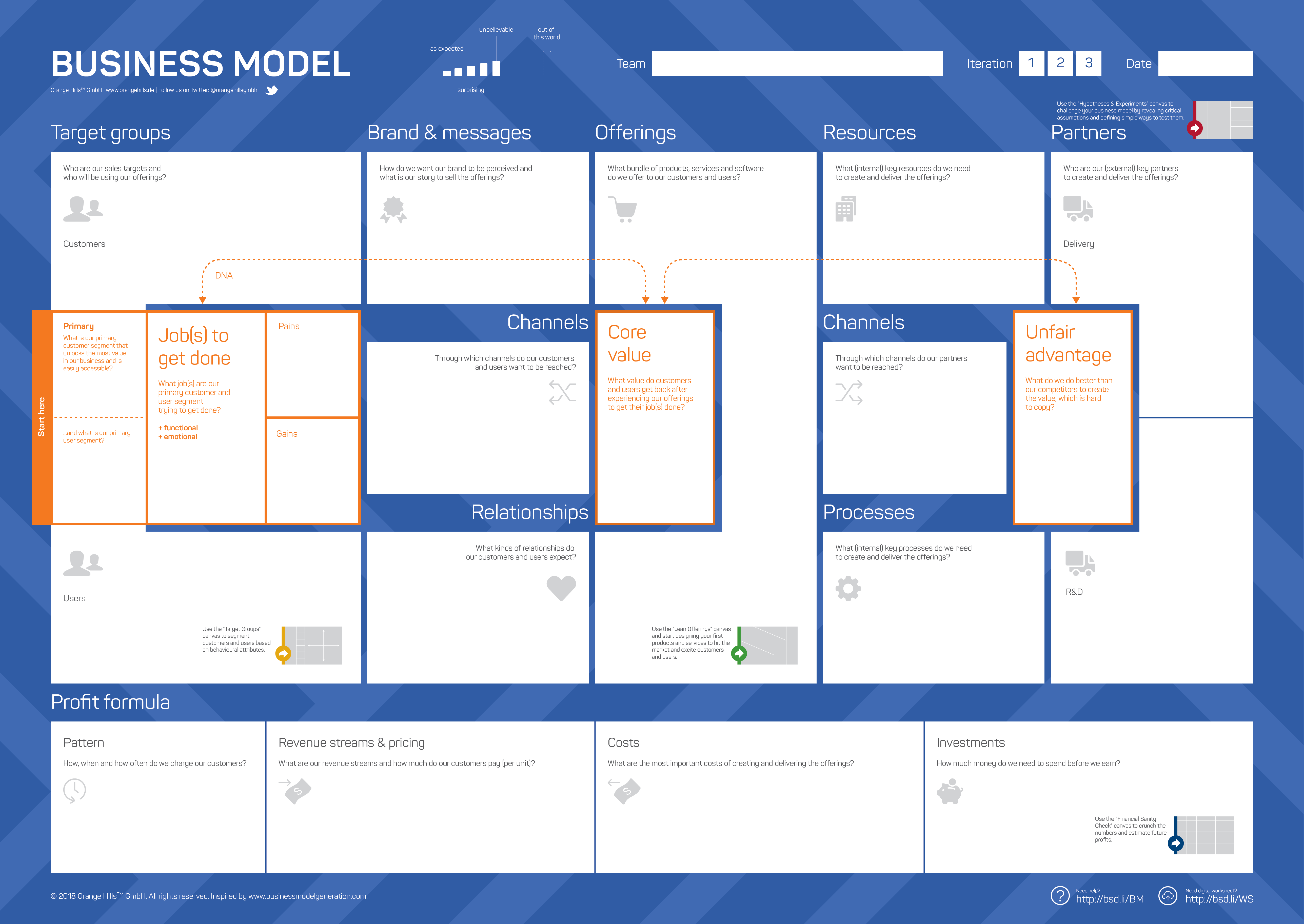
3. Key Elements
Element | Question | Comments |
Target groups | Who are our sales targets and who will be using our offerings? Primary target group: What is our primary customer and user segment that unlocks the most value in our business and is easily accessible? | Good criteria to select a primary target group: Positive lifetime value (CLV), easily accessible, well-understood (Job(s) to Get Done), ready to spend, open-minded. |
Brand & messages | How do we want our brand to be perceived and what is our story to sell the offerings? | Do this box at the end! It is a kind of verbal summary in nice words. |
Channels (to primary target group) | Through which channels do our customers and users want to be reached? | Keep in mind that every post-it in this section usually costs a lot of money. Identify not more than one to two key marketing and sales channels. |
Relationships | What kinds of relationships do our customers and users expect? | Define the relationship type: personal, anonymous, self-service, community-driven, etc. |
Offerings | What bundle of products and services do we offer to our customers and users? | This section is different from the original Business Model Canvas. It is not about fancy words but a very concrete picture of what the team is going to offer. |
Resources | What (internal) key resources do we need to create and deliver the offerings? | No complete list needed. The purpose is to understand what the strategically most important resources are that should be kept internally. It is about the make-or-buy decision. |
Processes | What (internal) key processes do we need to create and deliver the offerings? | Same here. No complete list. The purpose is to understand what the strategically most important processes and skills are that should be kept internally. |
Channels (to partners) | Through which channels do our partners want to be reached? | Not always required. Only relevant for platform businesses where a company has to handle many partners and needs efficient channels to reach them (e.g. partner conference). |
Partners | Who are our (external) key partners to create and deliver the offerings? | We distinguish between R&D partners (only needed once to build a new product) and delivery partners (needed every time a customer buys something). |
Profit Formula |
| If you are at the very beginning of your innovation journey, postpone this discussion to a later stage. Use the Financial Sanity Check to work through the numbers in more detail. |
DNA |
| Do the DNA at the end and all three boxes together in one exercise. A good Job(s) to Get Done statement is usually structured as follows: |
4. Usage Scenarios
Visualising today's business model
Creating "high-level" future scenarios as business models
Analysing customers' or competitors' business models
Comparing two or more business model scenarios side-by-side to identify the most promising direction
Be aware that a Business Model on one page is always a simplification. It is a starting point -- not the end of the discussion (see Instructions for Coaches below).
We sometimes use a reduced version of the Business Model template to create and visualise business ideas at an earlier stage -- already with a clear customer focus but without going into all elements yet. This is especially useful when your team creates multiple scenarios in the Design Workshop and you want to compare directions quickly before going deep.
5. Instructions for Coaches
The Business Model template is one of the most frequently used tools in Business Design -- and one of the most frequently misused. Here is what you need to know as a coach.
Moderation sequence. Don't let the team fill in the template top-left to bottom-right like a form. Start with the DNA to align on the core story. Then move to Target groups and Offerings to anchor the discussion in customer reality. Only then move to the internal components (Resources, Processes, Partners) and finally the Profit Formula. This sequence prevents the team from getting lost in operational details before they have clarity on who they serve and why.
Watch out for bullsh*t bingo. The Business Model template is a great tool to create a high-level overview of business models. At the same time, it is the perfect invitation to compile a collection of bullsh*t bingo statements with almost no meaning. There is more to do to literally design and understand a new business. If you notice the team writing vague phrases like "innovative solutions" or "best-in-class service", stop them. Ask: What exactly does this mean? How does the customer experience this? What is the specific activity behind this label? Don't let them move on until the answer is concrete.
Manage depth vs. breadth. A common mistake is spending 90 minutes perfecting one element while ignoring others. Set a timebox per element (10-15 minutes) and use a "parking lot" for open questions. Remind the team: the first version of a Business Model is never the final one. You will iterate.
Use inspiration tools when energy drops. If the Business Model looks boring or too similar to today's model, bring in the Business Model Inspirator or the Big Data Inspirator to challenge assumptions. Trigger questions, extreme goals, or analogy thinking also help. A lack of creativity is often a sign that the team did not dig deep enough in the Discover Phase.
When the team gets stuck on the Profit Formula. If the team is at the very beginning of the innovation journey, it is fine to postpone the Profit Formula to a later iteration. Use the Financial Sanity Check later to work through the numbers in more depth.
6. Q & A
What if the team has a hard time finding clear answers to the questions of the template? It is an indication that you have either skipped the Discover Phase or not executed it properly. New and surprising insights are key to building meaningful business models.
What if the space on the template is not enough for some elements? The Business Model template is designed to create a first draft of a today's or future business model. We have other tools to visualise more detailed content (e.g. Job(s) to Get Done).
What if the Business Model template has been filled properly but, to be frank, it is boring? Use the Business Model Inspirator, the Big Data Inspirator, or other tools (e.g. extreme goals, trigger questions) to spur on the creativity. A lack of creativity is also a sign for a lack of surprising insights from the Discover Phase.
How many business model scenarios should we create? It depends on your project scope. In a typical Design Workshop, we create two to four scenarios and then narrow them down. Use the reduced version for quick comparisons and the full template for the scenarios you want to take forward.
When do we update the Business Model? After every major learning -- especially after the Validate Phase. Your Business Model is a living document. If it still looks exactly the same after running experiments, something went wrong.